
Honesty for your agents

Freeze the plan. Review it independently. Then build β€” so AI work cannot fake DONE.

Freeze review, living docs, and the right model for each stage β€” Thinking where judgment is needed, cheaper Auto for mechanical build β€” so you do not burn a frontier model on every step. Product runtimes stay in your apps; this kit ships the governance + honesty machinery.

Hierarchy of operators at consoles β€” oversight branching from one lead through review tiers to the work floor

Same CLI. Deeper history with MuseHub.

Overseer Kit already connects to MuseHub. You can run fully on GitHub alone; when you want Muse as the memory layer β€” content-addressed history, stronger continuity, GitHub as the mirror β€” flip the regime. Same ok commands. Not a second agent product.

Why governance honesty matters

AI-assisted development breaks down at the boundaries between sessions:

πŸ†— Overseer Kit makes skipping honesty expensive β€” not by running your product, but by governing how phased work proceeds.

Core safety β€” always on

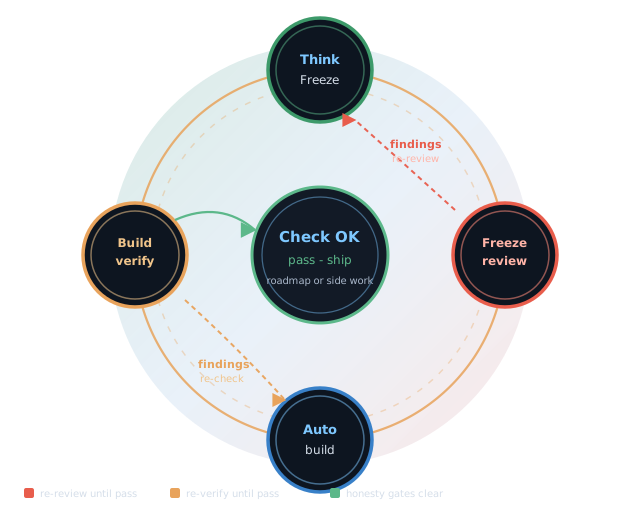
This is the center of the system β€” not an add-on. A phase freezes its contract, an independent review must pass, then Auto builds only against that freeze. Living docs and model-tier labels keep every session honest.

Frozen spec + freeze review

Thinking freezes WHAT/HOW. ok review --freeze (and the review loop) cites findings by file+line. No build claims DONE without a pass β€” that is how self-approval dies.

ROADMAP + Handover

ROADMAP is the phase board (status + model tier per phase). Handover is the session baton: what is true now and the one next paste-ready prompt.

Right model Β· lower spend

The kit is the rulebook, not the runtime: ROADMAP + ok route + policy/model-routing.yaml recommend Thinking vs Auto (and when to escalate). Your IDE/runtime actually dials the model. Spend the expensive thinking tier on freeze/design; mechanical build stays on cheaper Auto β€” that is deliberate cost control, not a slogan.

Hygiene before you stop

ok governance-sync --dry-run keeps ROADMAP and Handover aligned. Build-verification review gates Auto DONE the same way freeze review gates the spec.

Structure at a glance

How the kit is built — lanes, regimes, layers, and kit→consumer boundaries. (Scenarios below show who uses those pieces.)

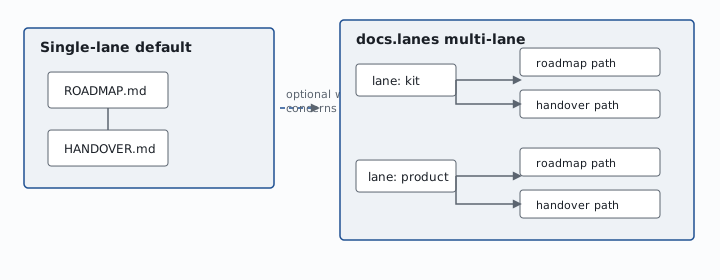
Lanes are few durable ROADMAP/HANDOVER pairs. Rows and manifests are many work units β€” do not invent a lane per ticket.
Single-lane ROADMAP paired with HANDOVER versus optional multi-lane kit and product paths
  • Single-lane default: ROADMAP ↔ HANDOVER
  • Optional multi-lane: each lane maps to its own living-doc pair
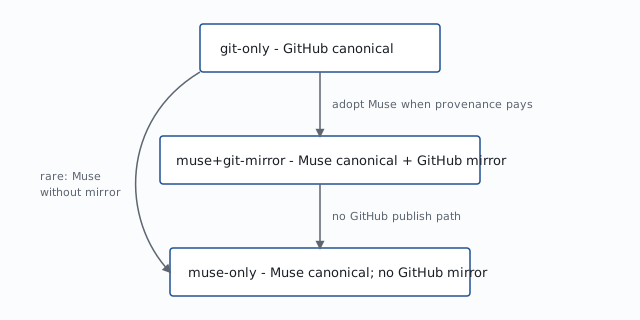
git-only is a first-class baseline. Muse regimes deepen substrate; they do not unlock exclusive core features.
VCS regimes from git-only to muse-plus-git-mirror to muse-only
  • git-only β€” GitHub canonical
  • muse+git-mirror β€” Muse canonical + GitHub mirror
  • muse-only β€” Muse canonical; no GitHub mirror
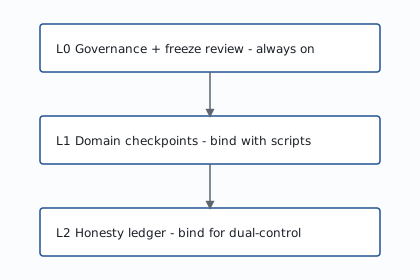
L0 (including freeze review) is the always-on safety loop. L1/L2 add mechanical domain evidence and the honesty ledger when your repo binds those modules β€” they are not β€œskip freeze review.”
Layer stack from L0 governance to L1 domain checkpoints to L2 honesty ledger
  • L0 β€” living docs, phases, freeze review (always on)
  • L1 β€” domain checkpoint orchestrator (bind when you have verify scripts)
  • L2 β€” honesty ledger / producerβ‰ verifier (bind when dual-control matters)
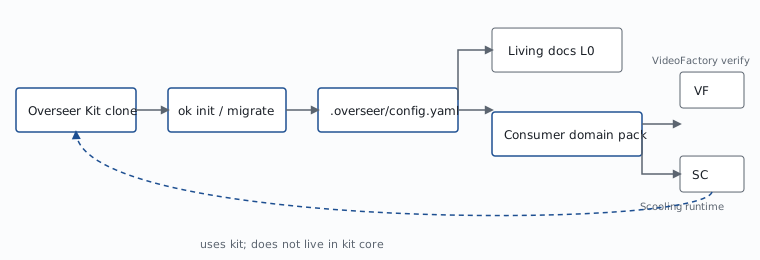
The kit ships sockets. Your apps own domain packs and product runtime UX.
Overseer Kit clone through ok init to config and living docs, then consumer domain packs
  • Kit clone β†’ ok init β†’ config + living docs
  • Consumers own verify scripts and product UX

Layers in plain language

L0 is not optional. Freeze review, living docs, and model-tier discipline ship as the baseline. L1 and L2 are extra mechanical sockets you bind when your domain has verify scripts or needs a hash-chained ledger β€” they do not replace freeze review, and they are not β€œthe review step.”

L0 β€” Governance (always on) ROADMAP Β· Handover Β· Thinking β†’ freeze β†’ review β†’ Auto Β· model-tier labels Β· governance-sync Β· build verification
L1 β€” Domain checkpoints (bind when ready) Consumer-owned verify scripts + manifests Β· ok verify-step orchestrator β€” why the flag exists: the kit cannot invent your video/export/research checks until you write them
L2 β€” Honesty ledger (bind when ready) Producer β‰  verifier Β· append-only hash chain Β· co-requirement hooks β€” dual-control when money/publish stakes require it
L3 β€” Optional deeper history Muse substrate when provenance pays for itself β€” never required for L0–L2

Defaults today: freeze review and living docs are the day-one path. checkpoints.enabled / honesty.enabled start off so a fresh ok init does not fail-closed waiting for scripts you have not written yet β€” turn them on when bound. Flipping those defaults kit-wide needs a dedicated Thinking freeze. CLI name is ok.

Open the local console

The public site does not run the console and does not mint session credentials. Open a local process, then use the UI in the browser or desktop shell.

Path 1 β€” Download Mac console preferred Β· Apple Silicon

  1. Confirm Python 3.11+ on the host (python3 --version).
  2. Download the signed Apple Silicon (aarch64) .dmg via the primary Download button above (Release v0.1.0).
  3. Optionally verify SHA256SUMS.txt and manifest signing.status: signed (see the desktop runbook).
  4. Bind a governed checkout before launch: set OVERSEER_REPO_ROOT to the absolute path of the repo that already has .overseer/ from ok init. Without that env var, the app binds the bundled kit root inside the app β€” useful for dogfooding the kit, not an automatic project picker.
  5. Open the app; the desktop shell auto-fills session bootstrap.
  6. Confirm the chrome shows the expected bound path before any write action.

Apple Silicon (aarch64) Mac Β· signed+notarized Β· requires Python 3.11+. Set OVERSEER_REPO_ROOT to your governed repo. Windows/Linux signed installers are not published yet. No in-app folder picker in Auto v1.

Path 2 β€” Browser (ok app)

  1. From a governed repo (.overseer/ present): ok app --open (or ok app, then open the printed URL).
  2. Default local URL: http://127.0.0.1:8765/ β€” works only on this machine after ok app is running (this public page is static and does not host the console).
  3. In the same terminal that started the server, copy session_credential and csrf_token.
  4. Paste into Session bootstrap β†’ Connect.
  5. Credentials are process-lifetime only; never commit them; this website never mints them.

Separate tool: read-only remote glance is ok hosted-dashboard (default http://127.0.0.1:8766/) β€” not the Path B console and not what overseerkit.com serves.

Path 3 β€” Dev desktop

  1. From kit root: ./scripts/bundle-desktop-kit.sh then cd desktop && npm install && npm run tauri dev.
  2. Same auto-fill behavior as Path 1; still needs Python 3.11+ plus Rust/Node for dev builds.

This console is bound to one local checkout. Reads and writes (when confirmed) apply only to that tree β€” not to overseerkit.com and not to arbitrary remote repos. Desktop Path 1/3: set OVERSEER_REPO_ROOT to your governed repo; otherwise the shell binds the bundled kit.

Operator detail: Desktop operator runbook Β· Release index: v0.1.0

Where to go next

This site explains Overseer Kit. Day-to-day product UX stays in your apps.

GitHub

overseer-kit β€” clone, ok init, living docs, issues.

Local console

After ok app is running on your machine: Open loopback console (127.0.0.1:8765). Start it with ok app --open β€” see Open the local console.

Docs

README and the docs tree β€” rendered on GitHub, not raw downloads.

Consumer pattern

Adapter pattern β€” kit sockets vs what your repo owns.

Optional MuseHub

Same CLI; optional content-addressed history when you need it. See MuseHub deepen and VCS regimes.

Clone / init (secondary path)

  1. Clone overseer-kit.
  2. From your consumer repo: ./cli/ok -C . init --regime git-only --non-interactive
  3. Open the handover living doc β†’ copy the paste-ready prompt into any chatbot.
  4. Run ./cli/ok governance-sync --dry-run before ending each session.

Audience: developers and operators. This site explains and routes β€” it is not an end-user task app.

Full guide: Git-only quickstart Β· Consumer adapter pattern Β· Muse-backed: MuseHub deepen / ok init --regime muse+git-mirror

GitHub β†’ Kit β†’ optional Muse

Start where you are. Add layers when stakes rise. Upgrade substrate only when provenance pays for itself.

β‘  GitHub today β†’ β‘‘ πŸ†— Overseer Kit layers β†’ β‘’ Muse when ready

Not another agent framework. Governance + honesty for developers β€” clone the kit or download the Mac console.

Scenarios

Persona stories with more detail than the structure diagrams β€” video studio, research, accounting, classroom, multi-org OSS β€” with maturity badges. Same site chrome as this page.

Open the scenario gallery β†’